How to Train an AI Chatbot With Your Own Data
On this page

Most AI chatbots fail for one simple reason: they’re disconnected from the business they’re supposed to support.
A chatbot that doesn’t know your refund policy, product catalog, or onboarding process becomes a liability fast. It frustrates customers, invents answers, and creates more support work instead of reducing it.
To make an AI chatbot genuinely useful, you need to train it on your own data.
And in this guide, we’ll show you exactly how to train an AI chatbot using your website content, help docs, PDFs, FAQs, and customer support data. Even if you’re completely non-technical.
Ready? Let's get started.
Why Train a Chatbot on Your Own Data?
A generic ChatGPT window is a brilliant trivia partner and a terrible customer service agent for your business.
It doesn't know your refund policy. It will, with great confidence, invent a discount code that never existed and promise next-day shipping to countries you don't ship to.
This changes the moment you train a chatbot using your own data:
- The bot answers in your voice
- Points to your real policies
- Shorter response times
- Doesn’t answer questions for which it doesn’t have information
- Handles the 60 to 70% of tickets that are some variation of five questions
- Pre-sales questions get answered instantly, which lifts conversion on product and pricing pages.
Note: The catch is that "trained on your own data" only delivers these benefits if the data is actually good. A bot trained on five outdated PDFs will give you five different flavors of wrong, fast.
What Types of Data Should You Train an AI Chatbot With?
This is where most teams either win or quietly fail. The bot is a mirror of what you feed it.
Feed it clean, current, well-structured content and it sounds like your best support rep.
Feed it a tangled folder of half-finished Google Docs and it will sound exactly like that.
So what should you actually use?
- Knowledge base articles and help documentation. These are the gold standard. They're already written for customer questions, already structured into topics, and already reviewed. If you have a help center, start here.
- FAQs. Short, question-shaped content is what retrieval loves. A page titled "What is your return policy?" with a clean two-paragraph answer will outperform a 3,000-word policy PDF every time.
- Product documentation and manuals. Especially valuable for technical products, SaaS tools, hardware, or anything with setup steps.
- Past customer support tickets and email transcripts. A treasure trove, but handle with care. They contain real questions in real customer language, which helps the bot match phrasing. They also contain PII and the occasional rude exchange.
- Website content. About pages, pricing pages, policy pages, shipping pages, and "how it works" sections all carry information customers ask about constantly.
- Blog posts and tutorials. Good for "how do I" questions and edge cases that never made it into formal docs.
- Internal SOPs and team wikis. If you want an internal bot for your support team (rather than customer-facing), this is the starting point.
- Chat logs and conversation transcripts. From live chat tools, these reveal how customers actually phrase things, often very differently from how you wrote your articles.
- Video transcripts. YouTube tutorials, webinar recordings, and product demos turn into training data once transcribed.
- Product catalogs. For e-commerce, structured product data (specs, sizes, materials, compatibility) is a quiet superpower.
- PDFs, Word docs, and spreadsheets. Useful, but they often need cleaning. PDFs with multi-column layouts and embedded tables are a particular headache.
What NOT to Train Your Chatbot On
Just as important is knowing what to keep out.
Some content is actively dangerous to include. The fastest way to break a chatbot is to feed it contradictions and let it confidently pick the wrong one.
- Outdated content. Last year's pricing, the policy you changed in March, the integration you sunsetted. If it's wrong, retire it from the source, don't just hope the bot will figure out the date.
- Contradictory documents. Two pages, one says 30-day returns, one says 60-day returns. The bot will pick one. You won't like which.
- Private or sensitive material. Internal HR policies, financial projections, employee names, payment data. If you wouldn't paste it into a public webpage, don't pour it into the bot's training set.
- Customer PII from old tickets. If you do use historical tickets, scrub names, emails, addresses, order numbers, and account IDs first.
- Low-quality content. Marketing fluff full of adjectives and no facts will dilute retrieval quality. The bot doesn't need "We are passionate about quality." It needs "Our standard shipping takes 3 to 5 business days."
- Speculative or aspirational content. Roadmap docs, "coming soon" features, internal debates. The bot will treat them as fact and promise features you haven't built.
Methods of Training an AI Chatbot
There are multiple methods of training an AI chatbot. Some are about feeding it raw data, others are about optimizing how AI replies to answers.
1. Retrieval Augmented Generation (RAG)
The default approach for nearly every modern AI chatbot you can buy off the shelf
Upload documents, the system indexes them, and the bot answers from that index at query time.
Fast setup, easy to update, low cost per conversation.
This is what HelpJet (the tool that we will be using for this tutorial) does, and what you almost certainly want.
2. Fine-tuning
Take a base language model and retrain part of it using thousands of your own examples.
This is useful for niche languages (medical, legal, or code) or specific tones. However, it is expensive and slow, and rarely worth it for customer support.
Skip it unless a consultant gives you a very specific reason not to.
3. Prompt engineering
Crafting the instructions that the bot follows, such as "Act as a helpful support representative for Acme Co., respond in under three sentences, and escalate billing disputes to a human."
This is an additional layer on top of either RAG or fine-tuning.
You'll do some of this whether you realize it or not.
4. Hybrid approaches
Most serious deployments combine RAG (for current facts) with prompt engineering (for tone and behavior) and, occasionally, a small amount of fine-tuning (for very specialized vocabulary).
For 95% of small-to-mid-sized businesses, pure RAG plus thoughtful prompts is the right answer.
The trade-offs are pretty simple, really.
RAG is cheap, current, and transparent (you can see which document the answer came from).
Fine-tuning is expensive, brittle, and opaque. If you ever hear "we need to retrain the model to fix that wrong answer," walk away.
With RAG, you fix the wrong answer by editing the source article. Easy.
How to Train an AI Chatbot With Your Own Data (Step-by-step)
Now that you understand a little bit about training AI chatbots, let’s start with the actual tutorial.
Step 1: Create Your First AI Chatbot
There are hundreds of platforms out there that will help you to create an AI chatbot, but we recommend HelpJet. It’s simple, free to start, and very flexible.
Here’s how to create an AI chatbot with HelpJet:
- Go to HelpJet.com
- Create an account (login in if you already have one)
- Create your bot by clicking on the “+ Create New Bot” button
- Follow the setup wizard. It will ask you to name your bot, training data, preview, and deploy.
Once you create your AI chatbot, you should be ready to train it further, and add more of your data.
Step 2: Connect Your Data Sources
This is the part that determines whether your bot is brilliant or useless.
An AI chatbot created with HelpJet can connect to your existing knowledge base, website and learn from your PDF files.
To train your AI chatbot on your data:
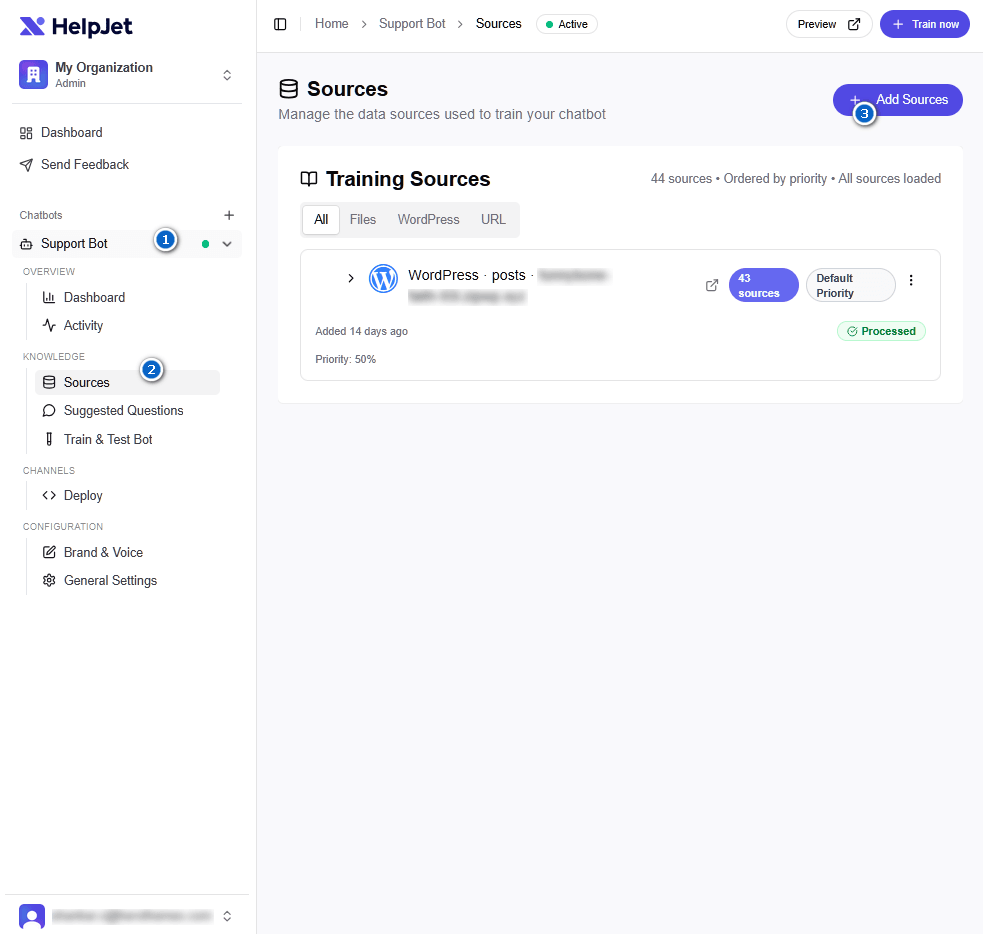
- Head over to HelpJet dashboard
- Click on your created AI chatbot from the left sidebar, then click on sources.
- Add your sources
HelpJet supports these types of sources:
- WordPress website with optional authentication. This will add all available data from your WordPress site. Don’t worry, you can remove/exclude unnecessary data from the dashboard.
- URLs and sitemap: Paste in your help center, FAQ page, pricing page, and any other public URLs. The crawler pulls the content and adds it to the bot's knowledge.
- Files: Drag and drop manuals, policies, product spec sheets, and the like. Right now only PDF files are supported, but you can expect support for other file types (Word documents or text files) in upcoming weeks.
We will recommend starting narrow. For most sites, the right move on day one is to connect:
- Your top-level FAQ page
- Your shipping, returns, and privacy policy pages
- Your 20 to 30 most-viewed help articles
- Your pricing page
You can always add more. Adding less first, however, lets you see clearly what the bot does and does not know, which makes debugging far easier later.
Step 3: Configure the Bot's Persona and Behavior
Once the content is ingested, you get to set the rules.
HelpJet exposes these through a Brand & Voice settings panel, no code, no prompt engineering degree required.
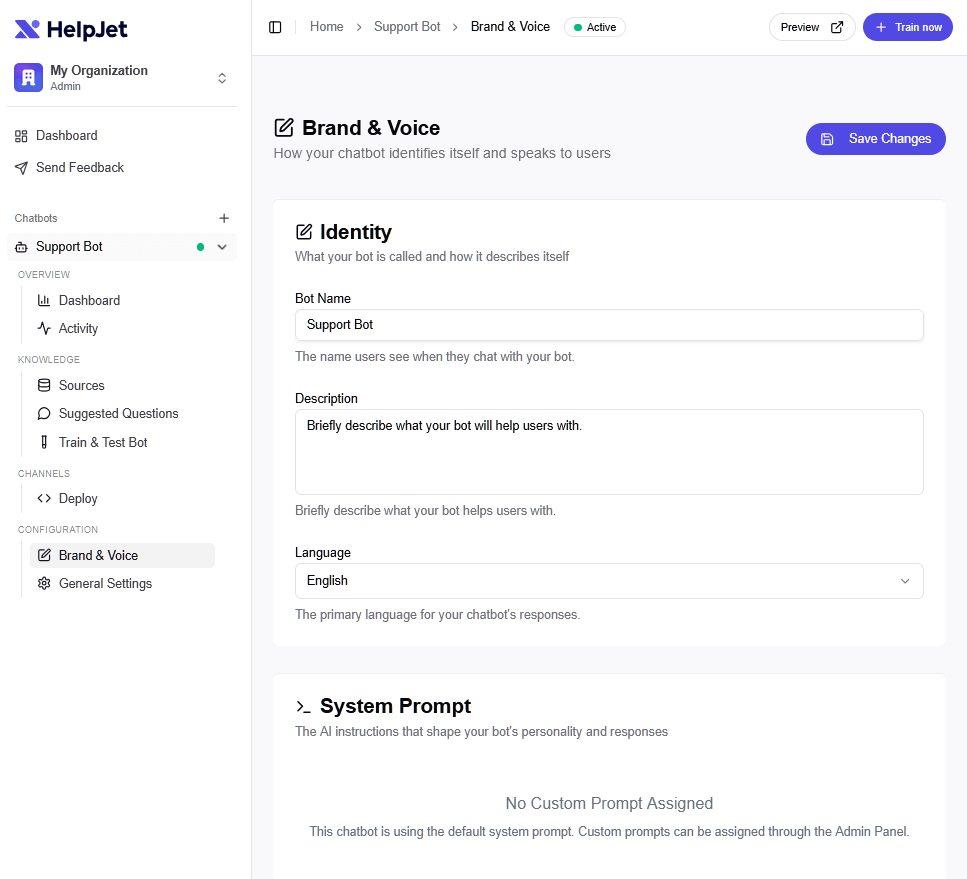
Here are the settings worth looking into:
- Bot Name: Give your bot a name (it doesn't need to pretend to be human, and frankly, shouldn't).
- Custom Prompt: Here you can add further information. Like fallback behavior, what to do when a bot is unable to answer a customer's question. It’s tone, or any other brand guidelines.
Step 4: Testing AI Chatbot
Now that you provided your AI chatbot with the data and instructions, it’s time to test it.
You don’t have to make it live, HelpJet gives you a preview window where you can chat with the bot privately before it ever touches your site.
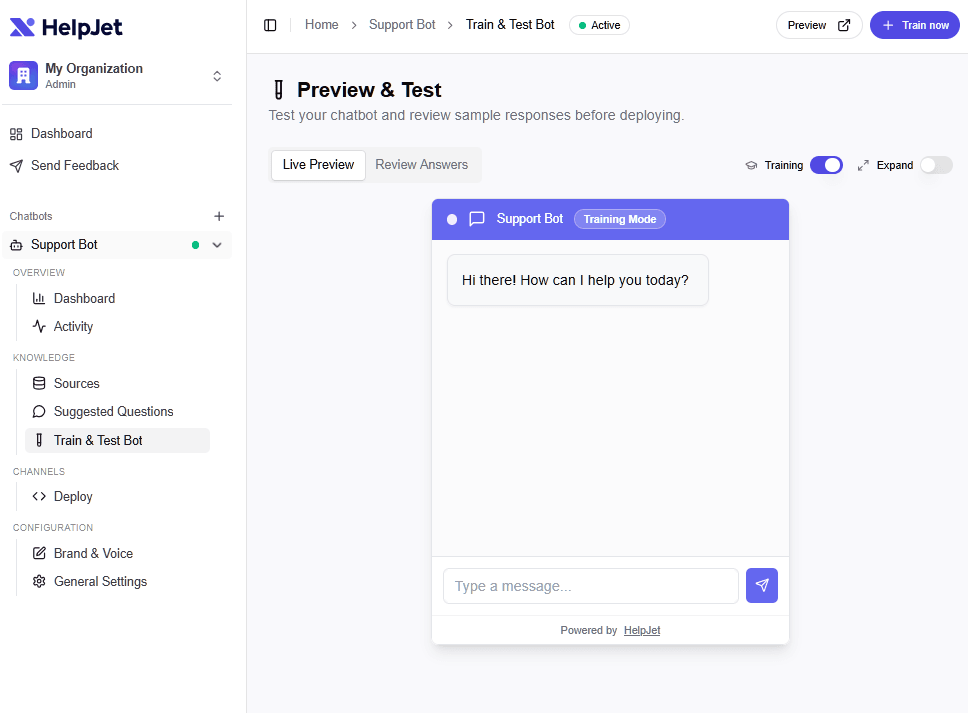
This is the step almost everyone skips, and almost everyone regrets. Use it.
Run through a checklist of real questions, the actual ones your team gets every week.
For example:
- Where is my order?
- How do I return something?
- Do you ship to [country]?
- Can I cancel my subscription?
- What payment methods do you accept?
- I got the wrong item.
- I want a refund.
- That one weird edge case you secretly hope nobody ever asks.
For each answer, check three things: Is it accurate? Does it cite the right source? Does it gracefully hand off when it can't help?
If the answer is wrong, don't adjust the bot.
Edit the source article and re-ingest. That habit, fixing content rather than fighting the model, is what separates teams who succeed at this from teams who burn out tweaking prompts for weeks.
Step 5: Embed the AI Chatbot on Your Website
We are mostly done with the training part. It’s time to embed a created AI chatbot on your website.
Select your HelpJet chatbot from the left sidebar, choose Deploy option.
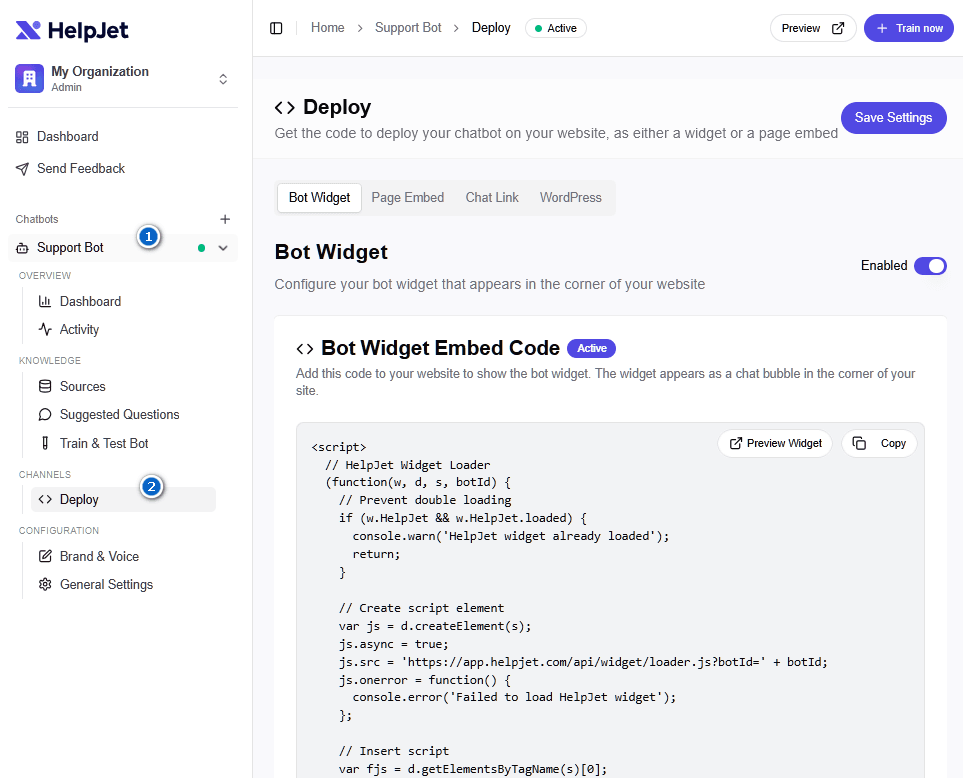
HelpJet gives you a small JavaScript snippet. Copy it, paste it into your site's header or footer (or, on WordPress, into a header script plugin or theme settings), and the chat widget will appear in the corner of every page.
HelpJet also provides a plugin for WordPress users:
- Download the HelpJet plugin from the WordPress section
- Then, upload and activate it on your WordPress website
Step 6: Monitor, Learn, and Iterate
You're not done at launch. You're at the start. HelpJet's analytics dashboard tracks the things that matter:
- Total conversations
- Most common questions
- Fallback rate (how often the bot says it doesn't know)
- Handoff rate to humans
- User feedback on individual answers (thumbs up or thumbs down)
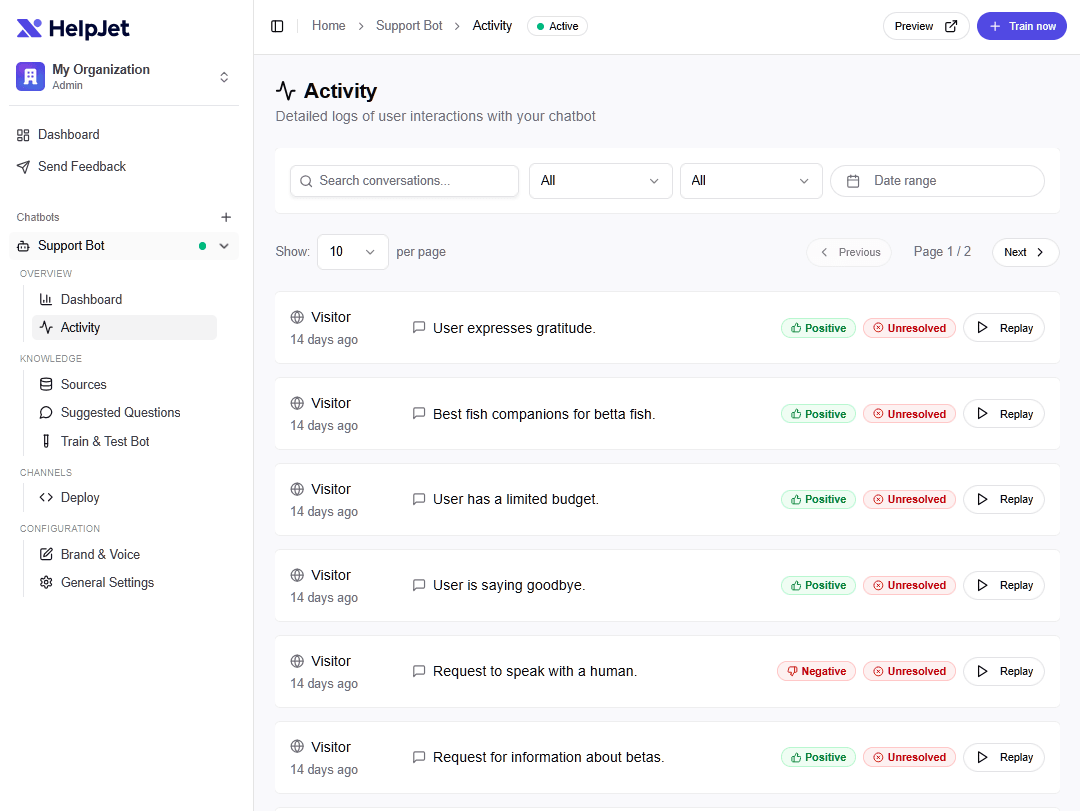
Spend an hour a week reviewing this. The fallback questions are your roadmap for new help articles. The thumbs-down answers are your roadmap for content fixes.
Treat the bot as a continuous mirror of your knowledge base, where every gap it surfaces is a chance to improve your docs.
Common Mistakes When Training an AI Chatbot With Your Own Data
We've watched dozens of these deployments, and the same handful of mistakes show up over and over.
Most aren't technical. They're decisions made under pressure that look fine on day one and quietly rot the bot over six months.
Here's the short list of what to avoid:
- Feeding it everything. Pouring your full Google Drive into the bot and assuming it will figure out what's current. It won't. Curate ruthlessly.
- No human escalation path. Customers who can't reach a human won't become loyal customers, no matter how clever the bot is.
- No ongoing monitoring. Set-and-forget kills these projects. The bot drifts as your business changes. Every product launch, policy update, or pricing change requires a content review.
- Expecting perfection at launch. Your bot will be wrong sometimes. Plan for that with feedback buttons, escalation paths, and a monthly review cadence.
- Ignoring privacy and compliance. Training on customer ticket data without redacting PII. Storing chat logs in jurisdictions your customers' regulators don't allow. Skipping vendor due diligence.
- Not updating data.
- Not testing edge cases. Especially around money. For example, if a customer asks "I'm a long-time customer, can you make an exception?" These need explicit handling in your prompt or fallback rules.
- Over-relying on AI for sensitive situations.
- Confusing deflection with success. A customer who gave up and left is also a "deflected" ticket. Measure satisfaction, not just ticket reduction.
- Trusting vendor demos without testing on your own data. Every chatbot tool looks brilliant on the demo dataset. Test on yours, with your weirdest tickets, before committing.
Final Thoughts
If there's one thing you should take away from this guide, it's this: No matter how good the AI chatbot is, it will provide wrong answers if your data is wrong or outdated.
Start small. Pick your top 10 questions and write good answers for them. Connect them to a tool. Test. Launch. Listen. Iterate.
That's the whole playbook, and it works whether you have 100 customers or 100 million.
Keep reading
- How To Deal with Angry Customers in 2026 (Scripts and Real Examples)Learn how to handle angry customers with proven de-escalation steps, calm response scripts, and practical ways to resolve complaints.
- 10 Best DocsBot Alternatives and Competitors (2026 Guide)
- 8 Best Free AI Chatbots for Websites in 2026Compare 8 free AI chatbots for websites by free plan limits, AI features, setup and upgrade cost, and find the right free chatbot for your site.
Put this into practice
HelpJet learns your docs and takes the repetitive questions off your plate. Set up in about 5 minutes.
Try HelpJet freeShare this article